
- How to Migrate from Rank Math to SureRank
- How to Migrate from Yoast to SureRank
- How to Migrate from SEOPress to SureRank SEO
- How to Migrate from Squirrly SEO to SureRank
- How to Migrate from All in One SEO (AIOSEO) to SureRank
- How to Migrate from Slim SEO to SureRank
- How to Migrate from The SEO Framework to SureRank
- Migration Failed: How to Diagnose
- After You Migrate: Verification and Cleanup Checklist
- Sitemaps in SureRank
- How to Enable Video Sitemap in SureRank Pro
- How to Enable the News Sitemap in SureRank
- How to Show the HTML Sitemap on Your Site in SureRank Pro
- How to Regenerate the Sitemap After Excluding a Post Type in SureRank
- Change the Sitemap URL in SureRank
- How to Enable Author Sitemap in SureRank
- How to Exclude Post Types from the Sitemap
- How to Enable the Author Sitemap and Why Authors Are Excluded (Pro)
- Editing Meta Box
- SureRank – Page SEO Checks
- Enabling Page SEO Checks in WordPress
- Image Alt Text – Automatic Optimization
- Link Manager
- Using the SureRank Front-End Meta Box
- How to Edit the Meta Title and Description for a Single Page or Post
- Controlling Indexing with Robot Instructions
- How to Set Global Title and Description Templates with Variables
- How to Set a Canonical URL and How the Canonical Field Works
- How to Fix WWW and Non-WWW Version Redirects to Improve Your SEO
- How to Fix: No H1 Heading Found on Your Homepage
- How to Fix Missing H2 Headings on Your Homepage
- Re-run Checks Button in SureRank
- Fix Critical Error: Another SEO Plugin Detected in SureRank
- Fix Warning: Site Tagline Is Not Set in SureRank
- How to Fix: Robots.txt Contains Invalid Rules in SureRank
- How to Fix Multiple SEO Plugins Detected on Your Site
- How to Fix: Homepage is Not Indexable by Search Engines
- Warning: Homepage Does Not Contain Internal Links
- How to Fix: Search Engine Title is Missing on the Page
- Page Level SEO: Broken Links Detected
- How to Fix Missing Alt Text on Images
- How to Fix Page URLs That Are Too Long
- Page Level SEO Warning: No Links Found on This Page
- Page Level SEO Warning: No Images or Videos Found
- Page Level SEO Warning: Missing Search Engine Description
- Page Level SEO Warning: No Subheadings Found on This Page
- Page Level SEO Warning: Canonical Tag is Missing
- Page Level SEO Warning: Open Graph Tags Missing
- What is Google Search Console and how does SureRank use it?
- Recommended Image Sizes
- SureRank – SEO Check Severity Guide
- Using SureRank with Other SEO Plugins – Best Practices
- Import/Export Feature – SureRank Plugin
- What is llms.txt and Does SureRank Support It?
- Does SureRank offer a keyword rank-tracking feature?
- Does SureRank Come With Google Analytics Integration?
- Email Summary in SureRank
- SureRank Role Manager
- Fixing a Fatal Error After Updating SureRank
- SureRank Server Requirements
- Search Engines Not Indexing Your WordPress Site?
- Sitemap Not Showing in SureRank
- Fixing robots.txt Issues in SureRank
- Why a Working Link Is Flagged as Broken (404)
- Which Pages Are Included in Your SureRank Sitemap
- Fixing False SEO Audit Warnings Caused by Caching
- Fixing “Couldn’t Fetch” for Your Sitemap in Google Search Console
- Troubleshooting: Favicon and Logo in Google Search Results (Supported Formats and CDN Gotchas)
- Customize XML Sitemap Top Bar with surerank_sitemap_top_bar_data
- Analyze ACF Field Content with SureRank
- Preserve Modified Date During Updates surerank_freeze_modified_date
- Customize Final Title Tag surerank_final_title
- Customize Post Type Archive Title Output surerank_post_type_archive_title
- Customize Archive Page Title with surerank_archive_title
- Customize the Search Results Page Title surerank_search_title
- Customizing the 404 Page Title surerank_not_found_title
- Customizing the Title Separator surerank_title_separator
- Disable SureRank’s Document Title Integration
- What Is AI Ready in SureRank?
- How to Fix the Indexing and Snippet Rules Result in SureRank AI Ready Checks
- How to Fix the Home Page Text Without JavaScript Result in SureRank AI Ready Checks
- How to Handle the OAuth Discovery Result in SureRank AI Ready Checks
- How to Handle the A2A Agent Card Result in SureRank AI Ready Checks
- How to Handle the Web Bot Auth Result in SureRank AI Ready Checks
- How to Fix the Site Slow and Site Unreachable Results in SureRank AI Ready Checks
- How to Fix the llms.txt Result in SureRank AI Ready Checks
- How to Fix the Content Signals Result in SureRank AI Ready Checks
- How to Fix the MCP Server Card Result in SureRank AI Ready Checks
- How to Fix the Agent Skills Index Result in SureRank AI Ready Checks
- How to Fix the auth.md Result in SureRank AI Ready Checks
- How to Fix the AI Catalog Result in SureRank AI Ready Checks
- How to Fix the Personal Agent Protocol Result in SureRank AI Ready Checks
- What Each AI Ready Check Means in SureRank
- How to Run AI Ready Checks and Fix the Results in SureRank
- How to Set Content Signals in SureRank
- How to Publish Agent Discovery Files in SureRank
- How to Fix a 403 on /.well-known/ Addresses
- How to Add DNS Agent Discovery Records
- Troubleshooting: Markdown, Link Header, or WebMCP Not Showing in AI Ready Checks
- How to Improve Your isitagentready.com Result With SureRank
How to Handle the OAuth Discovery Result in SureRank AI Ready Checks
The OAuth Discovery check in SureRank tests whether the site tells AI agents where to sign in with OAuth. OAuth is the standard way to give an app access to a site without sharing a password. This guide explains each message the check can show, and what to do about it.
Requirements
- SureRank and SureRank Premium, both active and updated to the latest versions
- An active SureRank Premium license (Pro, Starter, or Business). Upgrade here
- AI Ready turned on. See What Is AI Ready in SureRank?.
What the Check Looks At
SureRank looks for three files under /.well-known/ at the root of the domain. Any one of them is enough to pass:
- /.well-known/oauth-authorization-server
- /.well-known/openid-configuration
- /.well-known/oauth-protected-resource
A file counts only when it answers with HTTP 200 and is a JSON file that has a value in its issuer field. For oauth-protected-resource, the field is resource. An empty value, a file that is not JSON, or a normal web page does not count.
WordPress has no OAuth server of its own, so SureRank does not publish these files. It only checks whether something else on the site already does, such as an OAuth server plugin or an identity provider in front of the site.
The row shows Passed and reads “Your site publishes OAuth discovery for agents.” when one of the files is found.
SureRank saves the result for one day. Run Checks clears the saved result and looks again, so a change shows after the next run. The Fix It For Me buttons keep the saved result.
Before You Begin
If you’re looking to see what the check measured, follow the steps below.
- Go to SureRank → AI Ready → AI Ready Checks.
- Find the row “Agents cannot sign in to your site with OAuth.”
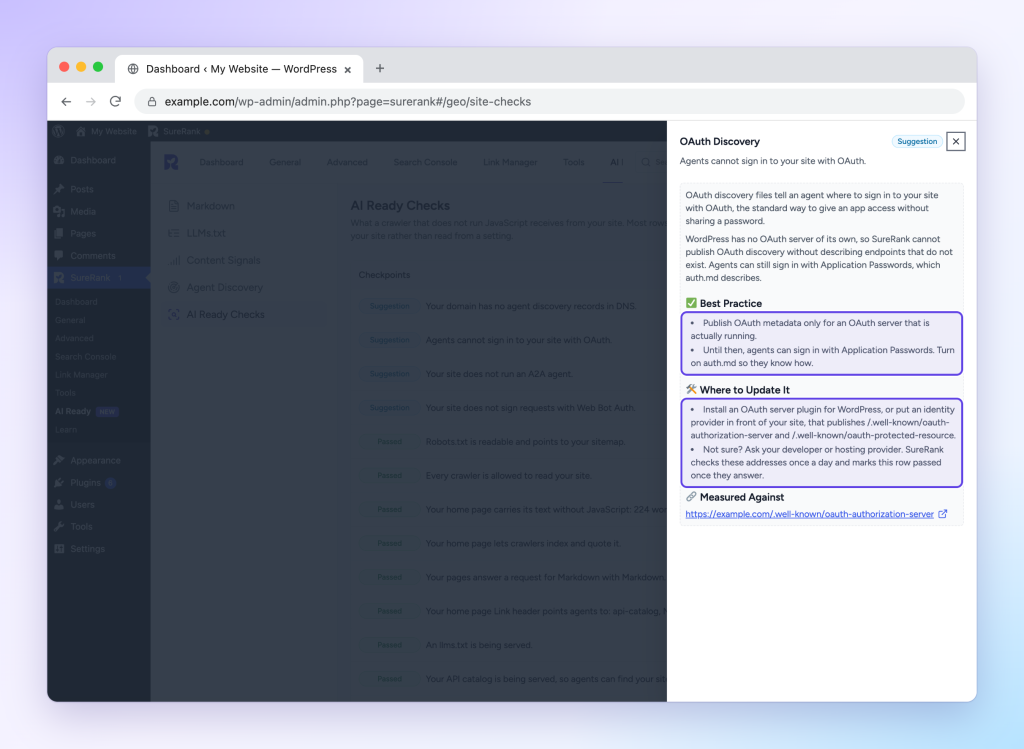
- Click the arrow button on the right of the row. The panel explains the check, lists the best practice and where to update it, and shows the address that was measured.
Common Issues
This section lists each message and what to do about it. The row has no Fix It For Me button, because SureRank cannot publish OAuth discovery without an OAuth server behind it.
Issue: “Agents cannot sign in to your site with OAuth.”
Symptom: The row shows a Suggestion. The panel adds that WordPress has no OAuth server of its own, and that agents can still sign in with Application Passwords, which auth.md describes.
Cause: None of the three files above is published. This is the normal result for a WordPress site that has no OAuth server.
Fix: There is nothing to fix if the site does not need OAuth. This Suggestion shows on every site that does not publish OAuth discovery, which is most WordPress sites. If your AI clients sign in with Application Passwords, you can ignore it. Agents can sign in with an Application Password instead. To tell agents how, turn on auth.md:
- Go to SureRank → AI Ready → Agent Discovery.
- Turn on Publish auth.md, and click Save. The file is served only while Application Passwords are available on the site. WordPress offers them on sites that use HTTPS, and a plugin can turn them off.
If the site does use OAuth, the OAuth server or the identity provider in front of the site must publish the files at /.well-known/oauth-authorization-server and /.well-known/oauth-protected-resource. Ask the developer or the hosting provider to set this up. SureRank cannot do it.
Expected outcome: Once one of the three files answers, the row no longer shows this message after you click Run Checks. If nothing else is found, it shows Passed. Turning on auth.md does not change this row.
Issue: The row shows Passed
Symptom: The row reads “Your site publishes OAuth discovery for agents.”
Cause: One of the three files answers with valid JSON.
Fix: There is nothing to fix.
Expected outcome: The row keeps showing Passed. If the file is removed later, the row changes to the Suggestion after the next Run Checks.
Issue: The row is not shown
Symptom: The OAuth Discovery row is not in the list.
Cause: One of two things:
- The site is installed in a subdirectory. Files under /.well-known/ count only at the root of a domain, so SureRank does not test them.
- SureRank could not reach the site while it tested the files. The screen then shows a different row about the site.
Fix: For a subdirectory install, publish the files at the root of the domain with whatever serves it. For an unreachable site, see How to Fix the Site Slow and Site Unreachable Results in SureRank AI Ready Checks.
Expected outcome: After the site can be reached, the row shows on the next run.
Still Not Resolved?
If the steps above do not help, contact the SureRank support team with the following details:
- WordPress version
- SureRank and SureRank Pro versions
- The exact message on the row in AI Ready Checks
- What you see when you open https://example.com/.well-known/oauth-authorization-server in a browser. Replace example.com with your domain.
Notes
- The same one-day result is used for the OAuth, A2A, and Web Bot Auth rows, so all three change together.
- SureRank checks for the files but does not publish them. For the files SureRank does publish, see How to Publish Agent Discovery Files in SureRank.
Related Docs
We don't respond to the article feedback, we use it to improve our support content.