
- Installing SureRank
- SureRank Onboarding Guide
- How to Activate Your SureRank Pro License
- SureRank Dashboard Overview
- General Settings
- Advanced Settings
- Search Console – SureRank
- Managing URL Redirection in SureRank
- SureRank Feature Management – Quick Guide
- Robots.txt Feature in SureRank
- Instant Indexing in SureRank Pro
- Using the Focus Keyword Feature in SureRank
- Using SureRank With WPML, Polylang, or TranslatePress
- How to Enable Markdown Copies in SureRank Premium
- Image SEO – SureRank
- Google Indexing in SureRank
- How to Configure Custom Fields with SureRank
- Breadcrumbs Feature in SureRank Pro
- Extended Meta Templates in SureRank Pro
- SureRank Pro – Link Suggestions
- Managing License Activations: Site Licenses, Staging, and Reusing a License
- How to Enable llms.txt in SureRank Pro
- How to Migrate from Rank Math to SureRank
- How to Migrate from Yoast to SureRank
- How to Migrate from SEOPress to SureRank SEO
- How to Migrate from Squirrly SEO to SureRank
- How to Migrate from All in One SEO (AIOSEO) to SureRank
- How to Migrate from Slim SEO to SureRank
- How to Migrate from The SEO Framework to SureRank
- Migration Failed: How to Diagnose
- After You Migrate: Verification and Cleanup Checklist
- Sitemaps in SureRank
- How to Enable Video Sitemap in SureRank Pro
- How to Enable the News Sitemap in SureRank
- How to Show the HTML Sitemap on Your Site in SureRank Pro
- How to Regenerate the Sitemap After Excluding a Post Type in SureRank
- Change the Sitemap URL in SureRank
- How to Enable Author Sitemap in SureRank
- How to Exclude Post Types from the Sitemap
- How to Enable the Author Sitemap and Why Authors Are Excluded (Pro)
- Editing Meta Box
- SureRank – Page SEO Checks
- Enabling Page SEO Checks in WordPress
- Image Alt Text – Automatic Optimization
- Link Manager
- Using the SureRank Front-End Meta Box
- How to Edit the Meta Title and Description for a Single Page or Post
- Controlling Indexing with Robot Instructions
- How to Set Global Title and Description Templates with Variables
- How to Set a Canonical URL and How the Canonical Field Works
- How to Fix WWW and Non-WWW Version Redirects to Improve Your SEO
- How to Fix: No H1 Heading Found on Your Homepage
- How to Fix Missing H2 Headings on Your Homepage
- Re-run Checks Button in SureRank
- Fix Critical Error: Another SEO Plugin Detected in SureRank
- Fix Warning: Site Tagline Is Not Set in SureRank
- How to Fix: Robots.txt Contains Invalid Rules in SureRank
- How to Fix Multiple SEO Plugins Detected on Your Site
- How to Fix: Homepage is Not Indexable by Search Engines
- Warning: Homepage Does Not Contain Internal Links
- How to Fix: Search Engine Title is Missing on the Page
- Page Level SEO: Broken Links Detected
- How to Fix Missing Alt Text on Images
- How to Fix Page URLs That Are Too Long
- Page Level SEO Warning: No Links Found on This Page
- Page Level SEO Warning: No Images or Videos Found
- Page Level SEO Warning: Missing Search Engine Description
- Page Level SEO Warning: No Subheadings Found on This Page
- Page Level SEO Warning: Canonical Tag is Missing
- Page Level SEO Warning: Open Graph Tags Missing
- What is Google Search Console and how does SureRank use it?
- Recommended Image Sizes
- SureRank – SEO Check Severity Guide
- Using SureRank with Other SEO Plugins – Best Practices
- Import/Export Feature – SureRank Plugin
- What is llms.txt and Does SureRank Support It?
- Does SureRank offer a keyword rank-tracking feature?
- Does SureRank Come With Google Analytics Integration?
- Email Summary in SureRank
- SureRank Role Manager
- Fixing a Fatal Error After Updating SureRank
- SureRank Server Requirements
- Search Engines Not Indexing Your WordPress Site?
- Sitemap Not Showing in SureRank
- Fixing robots.txt Issues in SureRank
- Why a Working Link Is Flagged as Broken (404)
- Which Pages Are Included in Your SureRank Sitemap
- Fixing False SEO Audit Warnings Caused by Caching
- Fixing “Couldn’t Fetch” for Your Sitemap in Google Search Console
- Troubleshooting: Favicon and Logo in Google Search Results (Supported Formats and CDN Gotchas)
- Customize XML Sitemap Top Bar with surerank_sitemap_top_bar_data
- Analyze ACF Field Content with SureRank
- Preserve Modified Date During Updates surerank_freeze_modified_date
- Customize Final Title Tag surerank_final_title
- Customize Post Type Archive Title Output surerank_post_type_archive_title
- Customize Archive Page Title with surerank_archive_title
- Customize the Search Results Page Title surerank_search_title
- Customizing the 404 Page Title surerank_not_found_title
- Customizing the Title Separator surerank_title_separator
- Disable SureRank’s Document Title Integration
- What Is AI Ready in SureRank?
- How to Fix the Indexing and Snippet Rules Result in SureRank AI Ready Checks
- How to Fix the Home Page Text Without JavaScript Result in SureRank AI Ready Checks
- How to Handle the OAuth Discovery Result in SureRank AI Ready Checks
- How to Handle the A2A Agent Card Result in SureRank AI Ready Checks
- How to Handle the Web Bot Auth Result in SureRank AI Ready Checks
- How to Fix the Site Slow and Site Unreachable Results in SureRank AI Ready Checks
- How to Fix the llms.txt Result in SureRank AI Ready Checks
- How to Fix the Content Signals Result in SureRank AI Ready Checks
- How to Fix the MCP Server Card Result in SureRank AI Ready Checks
Instant Indexing in SureRank Pro
What is Instant Indexing?
Instant Indexing is a feature in SureRank Pro that helps search engines like Bing (and others supporting IndexNow) learn about URLs when content is published, updated, or deleted.
Normally, search engines rely on crawlers to find your content, which can take days or weeks. With Instant Indexing, your site directly notifies search engines through the IndexNow protocol, which can speed up discovery. Acceptance does not guarantee crawling, indexing, timing, or ranking.
Benefits of Instant Indexing:
- Faster Visibility – Notify participating search engines of new or updated URLs for potentially faster discovery.
- Always Up-to-Date – Notify search engines about content changes so they can decide when to revisit them.
- More Control – Exclude selected post types from automatic IndexNow submissions.
How to Enable Instant Indexing
- Make sure the SureRank Pro plugin is installed and activated.
- From your WordPress dashboard, go to SureRank → Advanced Settings.
- Scroll down to the bottom, and you’ll find the Instant Indexing section.
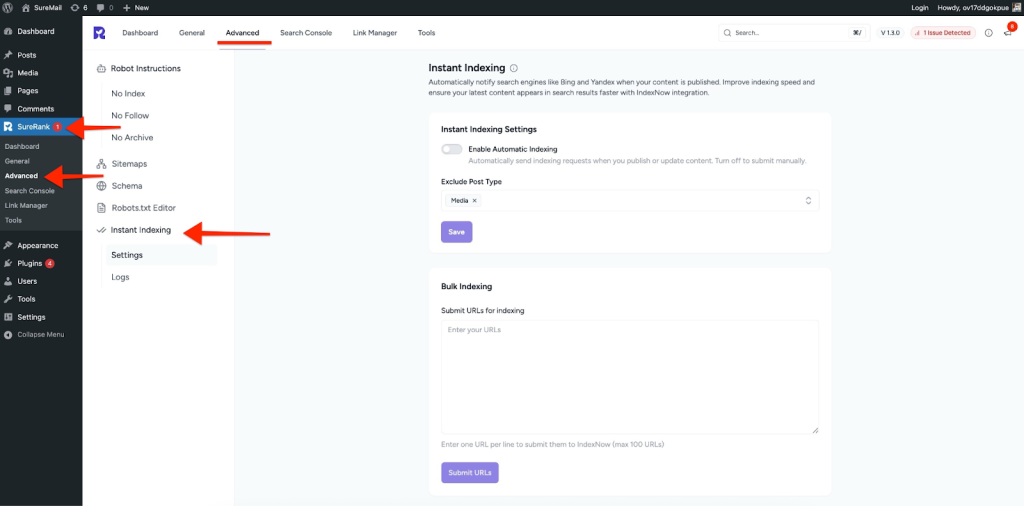
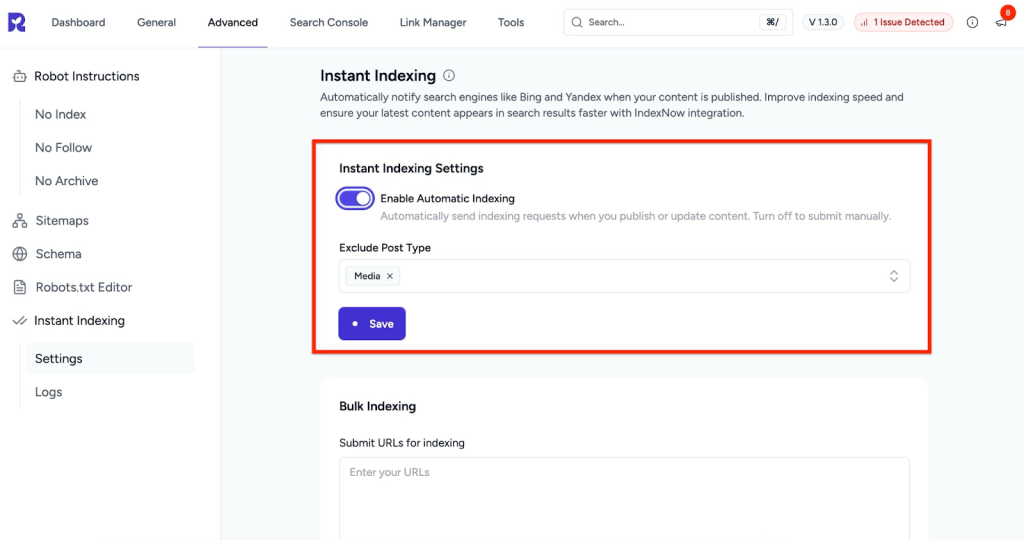
- Toggle Instant Indexing ON.
- Use the Exclude Post Types dropdown to exclude selected content types from automatic IndexNow submissions. This does not prevent indexing through other discovery routes. Use noindex on crawlable public pages when you want them excluded from search results.
- Example: Exclude a custom post type used for internal reference. Draft and private are post statuses, not post types.
- Click Save Changes to apply.
Using Bulk Indexing
You can also submit multiple URLs at once:
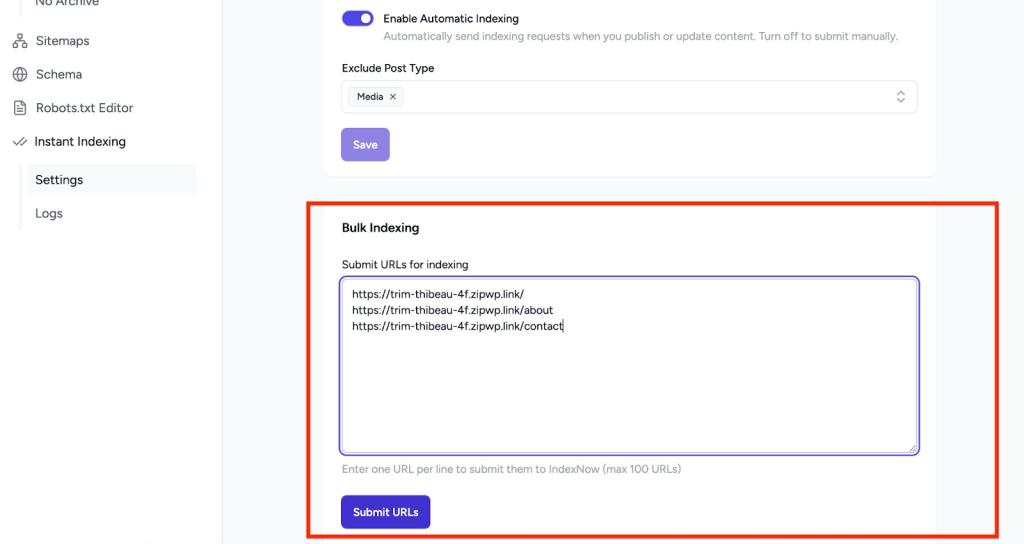
- Go to the Bulk Indexing section.
- Paste up to 100 URLs into the box.
- Click the Submit button.
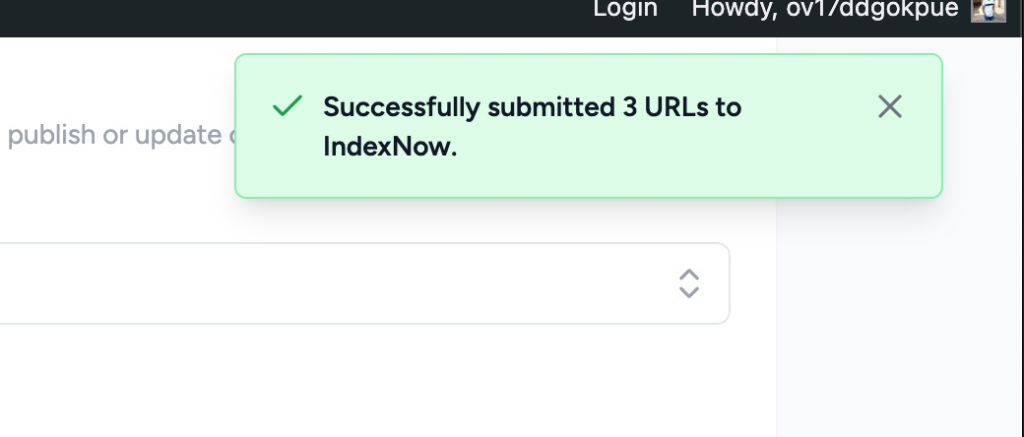
- The system will notify search engines and show how many URLs were successfully submitted.
Checking Indexing Logs
The Logs section allows you to track your submissions.
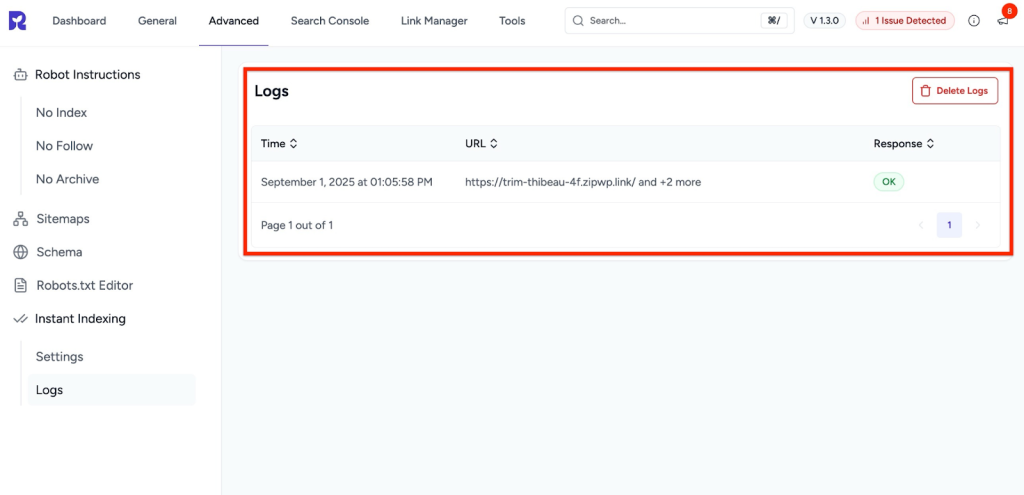
Here you can see:
- The list of URLs submitted
- The exact submission time
- Response status (e.g., Accepted by search engine)
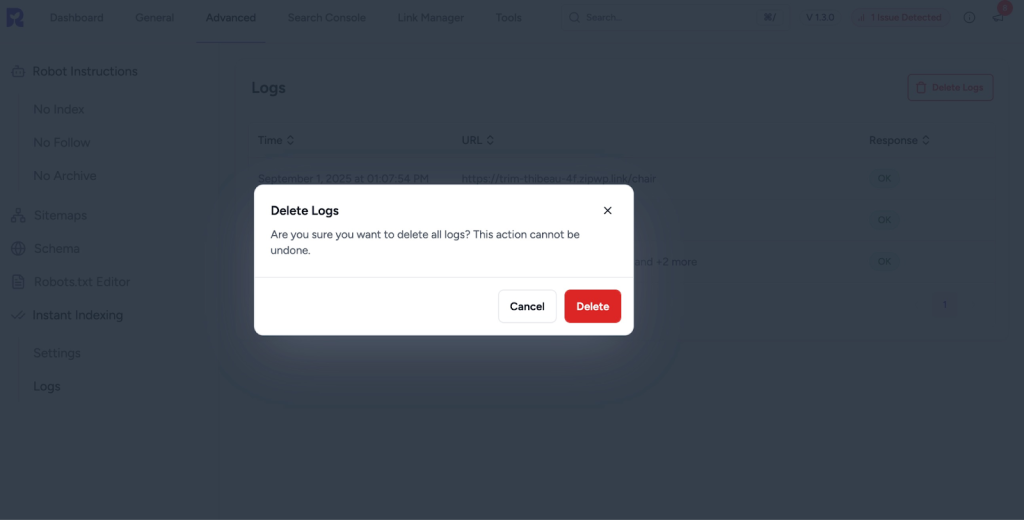
You can also Delete Logs if needed by clicking the Delete Log button. A pop-up will appear for confirmation before deletion.
Page Level Instant Indexing
Page Level Instant Indexing allows you to request indexing for individual Posts, Pages, or Custom Post Types (CPTs) directly from your WordPress dashboard. When content changes, you can notify participating search engines about its URL. They decide whether and when to crawl or index it.
This notification can help search engines discover new or updated content sooner.
How It Works
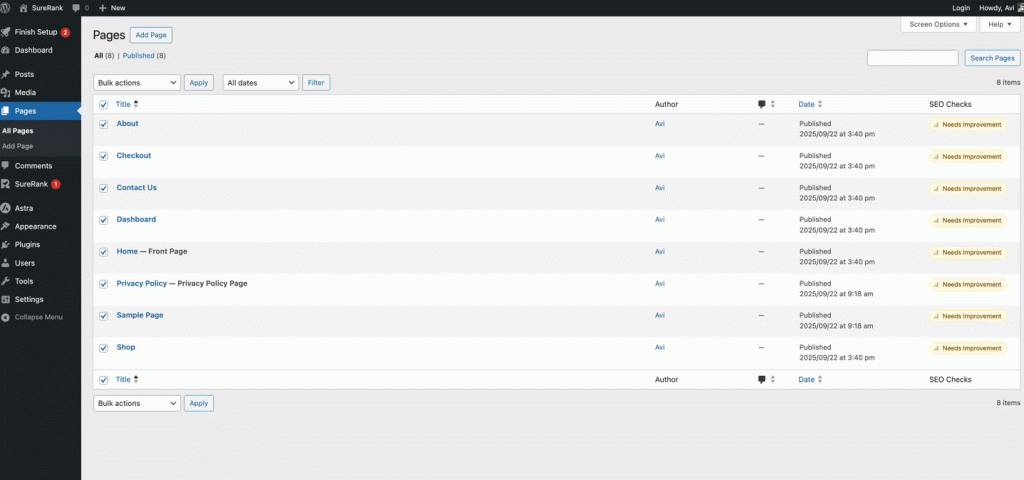
- Go to your WordPress dashboard and navigate to Posts, Pages, or any CPT.
- Select the Posts, Pages, or any CPT that you would like to index.
- Then, from the drop-down, select Submit to IndexNow
- Click the Apply button to send an immediate indexing request for that post, page, or CPT.
Best Practices for Instant Indexing
To get the most out of Instant Indexing in SureRank Pro:
- Exclude Unnecessary Post Types
- Exclude post types used for internal reference from automatic submissions where appropriate.
- This reduces noise and keeps search engines focused on your important content.
- Use Bulk Indexing Strategically
- Best for large content updates, product imports, or site migrations.
- Don’t overuse – submitting too often may not improve results.
- Monitor the Logs Regularly
- Check the logs to confirm that search engines are accepting your submissions.
- If you see errors, review your URLs or settings.
- Keep Content Quality in Mind
- Instant Indexing can speed up discovery, but does not guarantee crawling, indexing, or rankings.
- Ensure your content follows SEO best practices for long-term results.
Instant Indexing in SureRank Pro notifies participating search engines about URL changes. The search engines determine whether and when to crawl, index, or rank the content.
We don't respond to the article feedback, we use it to improve our support content.