
- How to Migrate from Rank Math to SureRank
- How to Migrate from Yoast to SureRank
- How to Migrate from SEOPress to SureRank SEO
- How to Migrate from Squirrly SEO to SureRank
- How to Migrate from All in One SEO (AIOSEO) to SureRank
- How to Migrate from Slim SEO to SureRank
- How to Migrate from The SEO Framework to SureRank
- Migration Failed: How to Diagnose
- After You Migrate: Verification and Cleanup Checklist
- Sitemaps in SureRank
- How to Enable Video Sitemap in SureRank Pro
- How to Enable the News Sitemap in SureRank
- How to Show the HTML Sitemap on Your Site in SureRank Pro
- How to Regenerate the Sitemap After Excluding a Post Type in SureRank
- Change the Sitemap URL in SureRank
- How to Enable Author Sitemap in SureRank
- How to Exclude Post Types from the Sitemap
- How to Enable the Author Sitemap and Why Authors Are Excluded (Pro)
- Editing Meta Box
- SureRank – Page SEO Checks
- Enabling Page SEO Checks in WordPress
- Image Alt Text – Automatic Optimization
- Link Manager
- Using the SureRank Front-End Meta Box
- How to Edit the Meta Title and Description for a Single Page or Post
- Controlling Indexing with Robot Instructions
- How to Set Global Title and Description Templates with Variables
- How to Set a Canonical URL and How the Canonical Field Works
- How to Fix WWW and Non-WWW Version Redirects to Improve Your SEO
- How to Fix: No H1 Heading Found on Your Homepage
- How to Fix Missing H2 Headings on Your Homepage
- Re-run Checks Button in SureRank
- Fix Critical Error: Another SEO Plugin Detected in SureRank
- Fix Warning: Site Tagline Is Not Set in SureRank
- How to Fix: Robots.txt Contains Invalid Rules in SureRank
- How to Fix Multiple SEO Plugins Detected on Your Site
- How to Fix: Homepage is Not Indexable by Search Engines
- Warning: Homepage Does Not Contain Internal Links
- How to Fix: Search Engine Title is Missing on the Page
- Page Level SEO: Broken Links Detected
- How to Fix Missing Alt Text on Images
- How to Fix Page URLs That Are Too Long
- Page Level SEO Warning: No Links Found on This Page
- Page Level SEO Warning: No Images or Videos Found
- Page Level SEO Warning: Missing Search Engine Description
- Page Level SEO Warning: No Subheadings Found on This Page
- Page Level SEO Warning: Canonical Tag is Missing
- Page Level SEO Warning: Open Graph Tags Missing
- What is Google Search Console and how does SureRank use it?
- Recommended Image Sizes
- SureRank – SEO Check Severity Guide
- Using SureRank with Other SEO Plugins – Best Practices
- Import/Export Feature – SureRank Plugin
- What is llms.txt and Does SureRank Support It?
- Does SureRank offer a keyword rank-tracking feature?
- Does SureRank Come With Google Analytics Integration?
- Email Summary in SureRank
- SureRank Role Manager
- Fixing a Fatal Error After Updating SureRank
- SureRank Server Requirements
- Search Engines Not Indexing Your WordPress Site?
- Sitemap Not Showing in SureRank
- Fixing robots.txt Issues in SureRank
- Why a Working Link Is Flagged as Broken (404)
- Which Pages Are Included in Your SureRank Sitemap
- Fixing False SEO Audit Warnings Caused by Caching
- Fixing “Couldn’t Fetch” for Your Sitemap in Google Search Console
- Troubleshooting: Favicon and Logo in Google Search Results (Supported Formats and CDN Gotchas)
- Customize XML Sitemap Top Bar with surerank_sitemap_top_bar_data
- Analyze ACF Field Content with SureRank
- Preserve Modified Date During Updates surerank_freeze_modified_date
- Customize Final Title Tag surerank_final_title
- Customize Post Type Archive Title Output surerank_post_type_archive_title
- Customize Archive Page Title with surerank_archive_title
- Customize the Search Results Page Title surerank_search_title
- Customizing the 404 Page Title surerank_not_found_title
- Customizing the Title Separator surerank_title_separator
- Disable SureRank’s Document Title Integration
- What Is AI Ready in SureRank?
- How to Fix the Indexing and Snippet Rules Result in SureRank AI Ready Checks
- How to Fix the Home Page Text Without JavaScript Result in SureRank AI Ready Checks
- How to Handle the OAuth Discovery Result in SureRank AI Ready Checks
- How to Handle the A2A Agent Card Result in SureRank AI Ready Checks
- How to Handle the Web Bot Auth Result in SureRank AI Ready Checks
- How to Fix the Site Slow and Site Unreachable Results in SureRank AI Ready Checks
- How to Fix the llms.txt Result in SureRank AI Ready Checks
- How to Fix the Content Signals Result in SureRank AI Ready Checks
- How to Fix the MCP Server Card Result in SureRank AI Ready Checks
How to Show the HTML Sitemap on Your Site in SureRank Pro
An HTML Sitemap is a page on your website that lists all your important pages, posts, and categories in a structured way. Unlike an XML Sitemap (made for search engines), an HTML Sitemap is designed for your visitors.
Why Add an HTML Sitemap to Your Site?
- It helps visitors quickly find content on your site.
- Improves user experience by providing a clear structure.
- Ensures no important page is missed when users are browsing.
- It can indirectly help with SEO by improving site navigation.
Steps to Display the HTML Sitemap
SureRank Pro makes it easy to display an HTML Sitemap on your site using a shortcode. Follow the steps below:
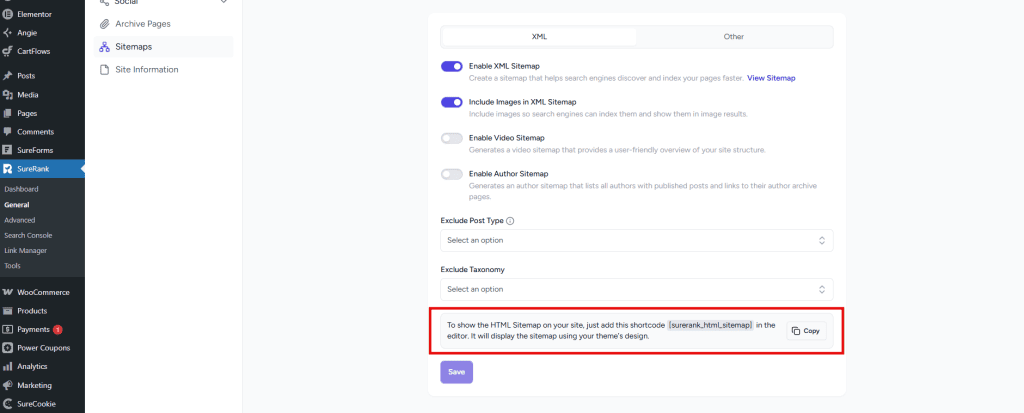
Step 1: Copy the Shortcode
Go to the SureRank settings→General → Sitemap section and click on the Copy button next to the HTML Sitemap shortcode:
Posts
- Where’s the Focus Keyword Field in SureRank?
- Where Is the Redirection Feature in SureRank?
- Is SEO Dead? Or Is It Evolving Again?
- How To Set Up SEO on WordPress: Complete Beginner’s Guide (2026)
- WordPress On-Page SEO Checklist: 20 Things To Do Before You Hit Publish
- SureRank Premium v1.6.0: Link Manager, Easier Migrations, and More
- WordPress SEO in 2026: The Complete Guide to Ranking on Google
- Changed a URL? Here’s How to Protect Your SEO With Redirects
- How To Find the Right Keywords for Your WordPress Site
- Introducing OG Image Generation in SureRank Premium, Your Posts Finally Look Great on Social
- Why Your Website Is Not Ranking on Google
- Why Your Blog Is Not Getting Traffic: The Real Reasons No One Talks About
- How to Do a Full SEO Audit on Your WordPress Site
- What Most AI SEO Tool Reviews Get Wrong
- What Google’s New AI Search Guidance Means for WordPress SEO
- SureRank 1.7.4 & Premium 1.7.1 Is Here: Guided Setup, Faster Redirections, and Better Builder Compatibility
- Best AI SEO Tools in 2026: Tested, Ranked, and Honestly Reviewed
- What Is Topical Authority and How to Build It for Your WordPress Blog
- Technical SEO Checklist for WordPress: 15 Fixes That Actually Move Rankings
- Answer Engine Optimization for WordPress: How to Get Mentioned by ChatGPT, Perplexity, and Google AI
- What’s New in SureRank 1.8.0: Schema Recommendations, Indexing Status, and More
- SEO Automation: 10 Ways to Put Your WordPress SEO on Autopilot
- How to Use a WordPress AI Assistant and Save Hours Every Week Writing
- Rank Math vs Yoast SEO vs SureRank
- SureRank 1.9.0 – Front-End SEO Editing, MCP and Headless Support, and Smarter Premium Tools
- Schema Markup for Beginners: How to Add Structured Data to WordPress Without Writing a Single Line of Code
- How to Create an SEO Growth Strategy for a New Website
- How to Set Up an XML Sitemap in WordPress and Submit It to Google
- SureRank 1.9.2: FluentCart SEO Support, Comment-Link SEO, and Key Fixes
- SureRank: Best Alternative to Rank Math
- SureRank Features Deep Dive: Everything the Plugin Can Do
- How to Automate Your WordPress SEO Workflow
- How to Fix a WordPress Site That Is Not Showing Up in Google
- WooCommerce SEO: The Complete Guide for WordPress Store Owners (2026)
- How to Do Internal Linking in WordPress the Right Way
- How to Write Meta Titles and Meta Descriptions That Actually Get Clicks
- What’s New in SureRank 1.10.0 & Pro 1.9.0
- Local SEO for WordPress: The Complete Guide for Businesses
- Free SEO Tools That Are Actually Worth Using
- How SureRank’s Built-In AI Automates Your WordPress SEO
- How to Update Old Blog Posts to Get More SEO Traffic
- How to Do a WordPress SEO Audit in 30 Minutes
- How to Set Up SEO on WordPress: The Complete Beginner’s Guide
- Why Is My WordPress Site Losing Traffic?
- Top 6 Best WordPress SEO Plugins
Pages
- Blog
- Support Policy
- Privacy Policy
- Docs
- Terms & Conditions
- Share Usage Data
- SureRank 101
- Thank You
- Brand Assets
- Refund Policy
- Affiliate Program Terms
- Our Philosophy
- SureRank AI
- Features
- Home
- Contact & Support
- Pricing
- SureRank vs Rank Math
- SureRank vs Yoast SEO
- SureRank vs SeoPress
- Contact & Support
- SEO Analysis
- Schema Builder
- Search Console Integration
- Cookie Policy
- Meta Templates
- Redirection Manager
- Migration
- Image Seo
- Ecommerce Seo
- Instant Indexing
- Link Manager
- Google Indexing
- SEO Analyze
- SureRank Free vs Pro
- SureRank Premium
- Role Manager
- Markdown and llms.txt for WordPress
- SureRank Black Friday 2026 | Save up to 47% on WordPress SEO
Docs
- Installing SureRank
- Search Engines Not Indexing Your WordPress Site?
- How to Test Schema Markup
- WebSite Schema
- SureRank Onboarding Guide
- Sitemaps in SureRank
- Person Schema
- WebPage Schema
- Article Schema
- Organization Schema
- BreadcrumbList
- SearchAction
- Product Schema
- How to Edit Page-Level Schema in SureRank
- What is Google Search Console and how does SureRank use it?
- General Settings
- Advanced Settings
- Editing Meta Box
- Recommended Image Sizes
- Image Alt Text – Automatic Optimization
- Sitemap Not Showing in SureRank
- Search Console – SureRank
- SureRank – SEO Check Severity Guide
- Enabling Page SEO Checks in WordPress
- SureRank – Page SEO Checks
- SureRank – RSS Content Protection
- SureRank – Automatic Description Generation
- Search Archive – SureRank SEO
- SureRank – Robots.txt File
- SureRank – Open Graph & X (Twitter) Tags
- Using SureRank with Other SEO Plugins – Best Practices
- SureRank Dashboard Overview
- Schema Setup in SureRank
- Customize Final Title Tag surerank_final_title
- Customize Post Type Archive Title Output surerank_post_type_archive_title
- Customize Archive Page Title with surerank_archive_title
- Customize the Search Results Page Title surerank_search_title
- Customizing the 404 Page Title surerank_not_found_title
- Customizing the Title Separator surerank_title_separator
- Disable SureRank’s Document Title Integration
- Customize Homepage Pagination Format surerank_homepage_pagination_format
- Customize SEO Title Length Check Threshold surerank_title_length
- Show or Hide Pagination in SureRank SEO Titles surerank_show_pagination
- Show or Hide Site Name in SEO Title surerank_show_site_name
- Customize Robots Meta Tags surerank_robots_meta_array
- Add “noindex” to Paginated Pages surerank_noindex_paginated_pages
- Customize Meta Description Length surerank_description_length
- Customize Product Category Rewrite Rules surerank_product_category_rewrite_rules
- Remove Product Category Base surerank_remove_product_category_base
- Customize Category URL Structure surerank_remove_category_base
- Disable Permalinks in RSS Feeds surerank_disable_permalink_in_feed
- Customize URL Length Check Threshold surerank_url_length
- Managing URL Redirection in SureRank
- How to Migrate from Rank Math to SureRank
- How to Migrate from Yoast to SureRank
- SureRank Feature Management – Quick Guide
- Control SureRank Feed Noindex Header surerank_disable_feed_indexing
- How to Regenerate the Sitemap After Excluding a Post Type in SureRank
- Import/Export Feature – SureRank Plugin
- Robots.txt Feature in SureRank
- FAQ Schema in SureRank
- How to Fix WWW and Non-WWW Version Redirects to Improve Your SEO
- Re-run Checks Button in SureRank
- Instant Indexing in SureRank Pro
- How to Migrate from SEOPress to SureRank SEO
- How to Enable Video Sitemap in SureRank Pro
- How to Show the HTML Sitemap on Your Site in SureRank Pro
- Fix Critical Error: Another SEO Plugin Detected in SureRank
- Fix Warning: Site Tagline Is Not Set in SureRank
- How to Enable the News Sitemap in SureRank
- Using the Focus Keyword Feature in SureRank
- HowTo Schema in SureRank
- Course Schema in SureRank
- How to Fix Multiple SEO Plugins Detected on Your Site
- How to Fix: No H1 Heading Found on Your Homepage
- How to Fix Missing H2 Headings on Your Homepage
- How to Fix: Homepage is Not Indexable by Search Engines
- Warning: Homepage Does Not Contain Internal Links
- How to Fix Missing Alt Text on Homepage Images
- How to Fix Missing Canonical Tag on Your Homepage
- How to Fix Missing Open Graph Tags on Your Homepage
- How to Fix Missing Structured Data (Schema) on Your Homepage
- How to Fix XML Sitemap is Not Accessible in SureRank
- How to Fix Search Engine Visibility Blocked in WordPress
- Connect Google Search Console
- How to Fix Site Not Served Over HTTPS in SureRank
- How to Fix Robots.txt File Accessibility Issues in SureRank
- How to Fix Missing Search Engine Title on Your Home Page
- How to Fix: Search Engine Title is Missing on the Page
- Page Level SEO: Broken Links Detected
- How to Fix Missing Alt Text on Images
- How to Fix Page URLs That Are Too Long
- Page Level SEO Warning: No Links Found on This Page
- Page Level SEO Warning: No Images or Videos Found
- Page Level SEO Warning: Missing Search Engine Description
- Page Level SEO Warning: No Subheadings Found on This Page
- Page Level SEO Warning: Canonical Tag is Missing
- Page Level SEO Warning: Open Graph Tags Missing
- How to Fix Home Page is Not Loading Correctly
- Event Schema in SureRank
- Movie Schema in SureRank
- Change the Sitemap URL in SureRank
- How to Fix No Images Found on the Homepage Warning
- Podcast Schema in SureRank
- Software Application Schema in SureRank
- Dataset Schema in SureRank
- Video Schema in SureRank
- Claim Review Schema in SureRank
- Book Schema in SureRank
- Job Posting Schema in SureRank
- Service Schema in SureRank
- Recipe Schema in SureRank
- How to Enable Author Sitemap in SureRank
- SureRank – Internal Link Suggestions
- How to Activate Your SureRank Pro License
- How SureRank’s AI Works
- What is llms.txt and Does SureRank Support It?
- How to Use Schema Pro with SureRank
- Image SEO – SureRank
- Does SureRank offer a keyword rank-tracking feature?
- Does SureRank Come With Google Analytics Integration?
- Local Business Schema in SureRank
- Google Indexing in SureRank
- Email Summary in SureRank
- How to Configure Custom Fields with SureRank
- Breadcrumbs Feature in SureRank Pro
- Extended Meta Templates in SureRank Pro
- SureRank Pro – Link Suggestions
- Using the Google Indexing API with SureRank
- How to Add a Custom Field in SureRank Schema
- SureRank Role Manager
- DiscussionForumPosting Schema in SureRank
- How to Migrate from Squirrly SEO to SureRank
- How to Migrate from All in One SEO (AIOSEO) to SureRank
- How to Migrate from Slim SEO to SureRank
- Link Manager
- How to Generate Open Graph Images in SureRank
- Customize XML Sitemap Top Bar with surerank_sitemap_top_bar_data
- Open External Links in New Tab
- Analyze ACF Field Content with SureRank
- Preserve Modified Date During Updates surerank_freeze_modified_date
- How to Fix: Robots.txt Contains Invalid Rules in SureRank
- How to Add Custom Schema in SureRank
- Using the SureRank Front-End Meta Box
- How to Edit the Meta Title and Description for a Single Page or Post
- Fixing robots.txt Issues in SureRank
- Enabling the AI (MCP) Integration and Connecting an AI Client
- How to Set Up and Use OG Image Generation in SureRank Premium
- How SureRank Chooses the Social (Open Graph) Image and How to Override It
- How to Grant SureRank Access to Specific User Roles (Role Manager)
- Controlling Indexing with Robot Instructions
- How to Set Global Title and Description Templates with Variables
- How to Set a Canonical URL and How the Canonical Field Works
- Why a Working Link Is Flagged as Broken (404)
- Migration Failed: How to Diagnose
- AI Generation Fails or Shows “Not a Valid JSON Response”
- Which Pages Are Included in Your SureRank Sitemap
- After You Migrate: Verification and Cleanup Checklist
- How to Set the Homepage, Shop, and Archive Title & Description
- Setting Up Site Information for Google’s Knowledge Panel
- Managing License Activations: Site Licenses, Staging, and Reusing a License
- Social Settings: Facebook/Open Graph, X (Twitter) Cards, and Profile Links
- Fixing False SEO Audit Warnings Caused by Caching
- Why Do My Image Links Redirect to a Blog Post or My Homepage?
- Understanding Page SEO Analysis: Where to Find It and How Checks Work
- Understanding the SEO Bar Column in Your Post and Page Lists
- Validating Your Schema: Rich Results Test Warnings vs. Errors
- How to Set Up and Use the SureRank Content Performance Table
- Fixing “Couldn’t Fetch” for Your Sitemap in Google Search Console
- How to Exclude Post Types from the Sitemap
- Regenerating the SureRank Sitemap Cache with WP-CLI
- Troubleshooting: Favicon and Logo in Google Search Results (Supported Formats and CDN Gotchas)
- Using SureRank’s AI Content Suggestions During Onboarding (Improve Description Helper)
- How to Enable the Author Sitemap and Why Authors Are Excluded (Pro)
- Understanding the robots.txt Analyzer in SureRank
- Managing Third-Party Integrations in SureRank
- Miscellaneous Settings in SureRank
- Fixing “Title/Description Too Long” Warnings
- Managing Author and Date Archives for SEO
- Setting Per-Author SEO for Author Archive Pages
- How to Bulk-Edit Index, Follow, and Archive Settings
- How to Set Up Local Business Schema for Multiple Locations in SureRank
- How to Migrate from The SEO Framework to SureRank
- Fixing a Fatal Error After Updating SureRank
- Managing Your Billing, Invoices, and Plan
- SureRank Server Requirements
- Using SureRank With WPML, Polylang, or TranslatePress
- Show Meta Title and Description in Post Lists surerank_show_meta_in_admin_list
- Customize Blocked Link Statuses surerank_link_manager_blocked_statuses
- How to Enable Markdown Copies in SureRank Premium
- How to Enable llms.txt in SureRank Pro
- How to Fix the Indexing and Snippet Rules Result in SureRank AI Ready Checks
- How to Fix the Home Page Text Without JavaScript Result in SureRank AI Ready Checks
- How to Handle the OAuth Discovery Result in SureRank AI Ready Checks
- How to Handle the A2A Agent Card Result in SureRank AI Ready Checks
- How to Handle the Web Bot Auth Result in SureRank AI Ready Checks
- How to Fix the Site Slow and Site Unreachable Results in SureRank AI Ready Checks
- How to Fix the llms.txt Result in SureRank AI Ready Checks
- How to Fix the Content Signals Result in SureRank AI Ready Checks
- How to Fix the MCP Server Card Result in SureRank AI Ready Checks
- How to Fix the Agent Skills Index Result in SureRank AI Ready Checks
- How to Fix the auth.md Result in SureRank AI Ready Checks
- How to Fix the AI Catalog Result in SureRank AI Ready Checks
- How to Fix the Personal Agent Protocol Result in SureRank AI Ready Checks
- What Is AI Ready in SureRank?
- What Each AI Ready Check Means in SureRank
- How to Run AI Ready Checks and Fix the Results in SureRank
- How to Set Content Signals in SureRank
- How to Publish Agent Discovery Files in SureRank
- How to Fix a 403 on /.well-known/ Addresses
- How to Add DNS Agent Discovery Records
- Troubleshooting: Markdown, Link Header, or WebMCP Not Showing in AI Ready Checks
- How to Improve Your isitagentready.com Result With SureRank
- Change the MCP Server Card surerank_pro_mcp_server_card
- Add Entries to the API Catalog surerank_pro_api_catalog_entries
- Add Entries to the AI Catalog surerank_pro_ai_catalog_entries
- Add or Remove Agent Skills surerank_pro_agent_skills
Categories
Step 2: Create a New Page
- From your WordPress Dashboard, go to Pages → Add New.
- Give your page a title, for example, “Sitemap”.
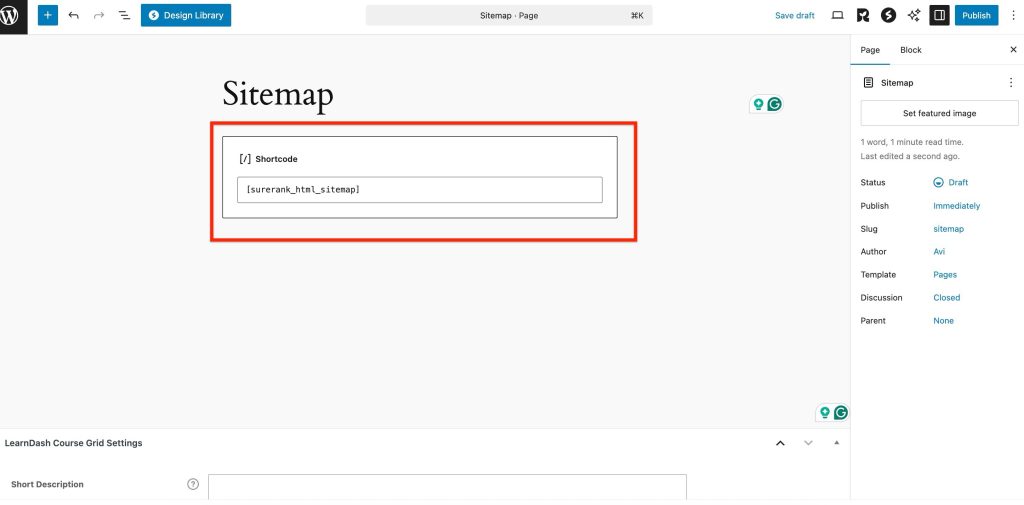
Step 3: Add the Shortcode
- Paste the copied shortcode into the editor.
Step 4: Publish the Page
- Click on Publish.
- Visit the newly created page on your site to see the HTML Sitemap in action.
What the HTML Sitemap Displays
The HTML Sitemap will automatically load:
- Eligible pages and posts from included post types
- Eligible entries from other included post types
- Eligible terms from included taxonomies
- Only entries present in the generated sitemap cache
The sitemap lists content eligible under your SureRank settings. Excluded or noindex content and empty taxonomies may be omitted. Inspect the published page to confirm which post types and taxonomies appear. If the sitemap is empty, check that the XML sitemap cache is available.
Tips & Best Practices
- Add it to your Footer: Place a link to your Sitemap page in the footer menu so it’s easily accessible from any page
- Keep it Simple: Avoid adding unnecessary styling or customizations—users expect a clean list format.
- Combine with XML Sitemap: Use the XML Sitemap for search engines and the HTML Sitemap for visitors to cover both needs.
- Check the published sitemap after content or settings change. Its entries come from the sitemap cache.
We don't respond to the article feedback, we use it to improve our support content.